
RECRUITMENT AND ONBOARDING PROCESS
PREP FOR JOB ADVERTISEMENT
MD Determine the need and Update the Position Description
MD Update advert on Indeed, specific for the position. Send link to other networks (NET, ACU, UPP team).
Example of time frames for Job ad:
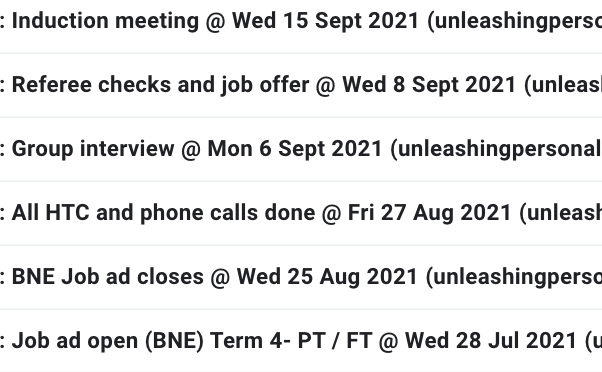
WEEK 1- GOING LIVE
Indeed Username: unleashingpersonalpotential@gmail.com
Passord: IndeedUPP1
Seek Username: admin@unleashingpersonalpotential.com.au
Password: Laura_5985
WEEK 1, 2 & 3- REGULAR MONITORING AND HIP TOUCH CHALLENGE REQUESTS- LONGLISTING
As applications come in...every few days
SA to place all candidates from Indeed on Seek, where they will be reviewed and managed.
SA to longlist (20 per position) candidates and request HTC. Refer to internal checklist: Qualities we Seek in Team Members. SA email longlisted candidates with Hip Touch Challenge Request via:
Text to candidate’s mobile (Director to text decent candidates and inform them to check emails). The purpose here, is to get a higher response on the HTC request email and get less drop out.
SA monitor replies and save all documents to Seek, add links for HTC videos to seek (notes section), or upload cover letters to the candidate application. Expected to receive half of the HTC requests back, and the other half will remove themselves from the process. Answer any questions they might have. Edit some out.
WEEK 3 OR 4- SHORTLISTING
Email timeline to those candidates who are still in the running. Recruitment process message template 4. Outline possible phone call coming, group interview date (to tentatively put aside in case they are invited to attend) and let them know that if they are coming to the group interview, they will receive an email explaining how they can best prepare for that.
SA to provide short summary of each shortlisted person (those who submitted a HTC) including relevant job / work experience, gender, age, availability, link to cover letter, CV and HTC video in the candidate shortlist sheet.
HOT and MD to review footage and shorten list.
WEEK 3 OR 4- HOT SHORT PHONE CALLS
HOT to review and contact interesting applicants (8 per position) for 10-20 min phone interview answering:
Send Recruitment process message template 5 the day before, or the day of the call.
3-4 more questions (over phone) in order to establish communication skills, connection, alignment, availability, income level and fit.
Give feedback on HTC- if you do come to the group interview, WWW, EBI.
HOT to complete phone interview using the HOT short interview questions. Note details in candidate shortlist sheet.
SA close job ad on Seek and Indeed after checking with MD. Sometimes we leave the ad open to attract further candidates.
WEEK 4- GROUP INTERVIEW
HOT to decide and SA to invite suitable people to group interview (4 per position). Expect one to drop out based on past experience.
SA to:
Set up calendar invite
Send interview email Recruitment process message template 8;
HOT to send Text to candidate’s mobile
Send template message to all other candidates who sent videos, keeping them on hold.
HOT to reach out to all applicants the day prior to the interview to:
Ensure they are are aware the interview is taking place
Ensure they have received the interview information and preparation email / webpage
Answer any questions they may have
MD and HOT conduct interview using Group Interview Process.
WEEK 5- FINAL CHECKS AND JOB OFFER
HOT to:
check referees, questions here.
HOT to call top candidate and clarify Q&A info, eg. availability, upcoming holidays, rate of pay and details of onboarding process.
Schedule an observation day with suitable candidate if possible (unpaid to determine if it is a fit for the candidate- would they love to do this work?). Use email Template 10- Instructions about your upcoming observation day.
HOT to call and make verbal offer and receive acceptance.
SA to Prepare contract and send email (Template 11- Candidate Offer Email) with onboarding steps. Includes DISC, team member details form, etc. Also, this includes an invite and instructions for the induction meeting.
Notify other candidates that they have been unsuccessful, through seek to those we didn't contact. Through email to those that we spoke to or contacted.
WEEK 6- INDUCTION SET UP
HOT to:
Advise SA on time and date of the induction meeting for SA to set up on Google Meet.
Create induction meeting agenda and distribute to internal attendees, delegating roles accordingly
HOT to liaise with coaches for setting up the first steps of the coaching journey
New team member receives invite to induction meeting.
SA to:
Set up induction Google Meet calendar invitation (use template emails for invitation)
Add info to the team member details sheet and team contact details sheet
Add their DOB into the calendar.
Upload files in right places on drive (create a new folder for the new person here >>)
Testimonial and headshot to go on UPP team page (written in 3rd person, check website for examples of existing team members).
Advise Laura to order UPP shirts for team members, by providing the correct size for new recruit.
Ensure team member has pay slip due (Sunday fortnightly) and pay day (Tuesday fortnightly) invites in calendar.
SA to ensure the following checklist is complete prior to the induction meeting:
Admin, Contracts & Compliance (This list should have been completed prior to the induction meeting)
Contract returned
Code of Conduct read, signed, and returned
Safeguarding of Children policy read and signed
WWCC confirmed
DISC & Motivators profile
Superannuation details received
TFN declaration received
New Team Member Details Form completed
DOB added to calendar
Team member details entered correctly in spreadsheet and also team contact details sheet
Marra has created and uploaded a personal folder in the correct Drive location
Any outstanding compliance items checked with Marra
Add to UPP Work Schedule invite in calendar (Friday). Gil to add into the Work Schedule spreadsheet.
Add to Pay Day invite in calendar (Tuesday)
Add to calendar invites for Holidays/Office weeks etc (Cody)
Volopay Access given (Cody)
Headshot and testimonial prepared (written in 3rd person) for UPP Team page
http://www.unleashingpersonalpotential.com.au/upp-team/
Director to ensure new team member has:
Access to the relevant google drive folders (UPP team internal; possibly Core team folder; UPP team facebook, FB messenger team groups)
Invite to any upcoming team trainings that are already in the team calendar (check next 12 months)
HOT to continue induction process using this webpage.
.